
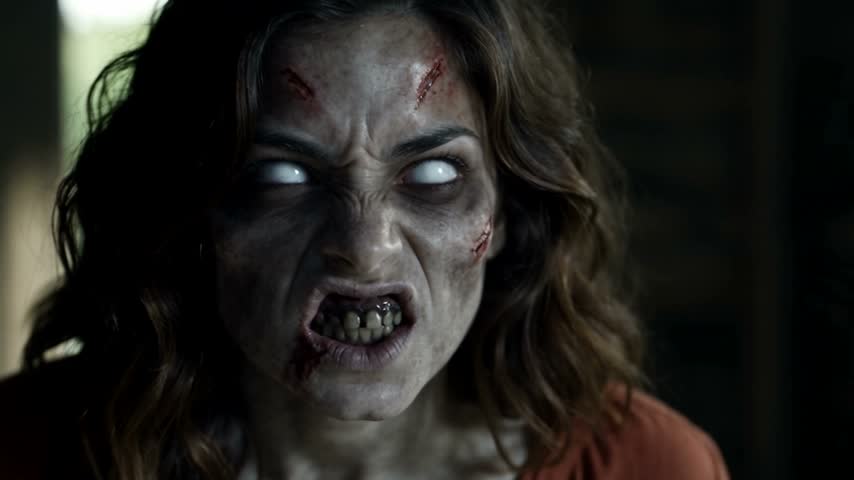
AI Zombie Trend Video Generator
Try the AI zombie trend with two photos: a familiar face, a lowered gun and an embrace that becomes a warm memory.
The short answer
The AI zombie trend tells a short emotional story: someone recognizes a loved one who has become a zombie, lowers their weapon and chooses an embrace. The action continues into a warm memory where both are healthy. This AI zombie video generator uses two reference photos to create that story in a single 15-second video. Choose two people or a person and pet, assign the survivor and zombie roles, then review the model and credit quote before generating.
What makes the AI zombie trend a love story?
The AI zombie trend is built around recognition rather than a fight. The survivor sees a familiar face, hesitates and lowers the gun. The zombie character approaches, and the movement into an embrace leads to a happier memory. That contrast gives the zombie love story its emotional shape: a cold encounter followed by a warm scene of connection. The AI zombie video can feature a partner, a friend or another person who agreed to appear.
Our version of the AI zombie trend prepares this sequence from your photos. You do not need to upload an existing film or write a shot list. The zombie love story uses a rural interior and an outdoor memory, with the model choosing the exact visual details. It is an original AI interpretation of the format, not a promise to reproduce a specific creator’s film, a licensed song or every cut in a reference clip.
Choose two photos for your AI zombie video
Two clear reference photos give each character a separate identity. For your AI zombie video, upload the survivor first and the zombie character second. Use one visible subject per photo, with an unobstructed face and enough detail to recognize the person. Even lighting, a natural expression and a visible hairstyle are more useful than dramatic filters. A group photo can introduce extra faces; a heavily cropped face can leave too little information for wider scenes.
The AI zombie video generator uses the reference photos for identity while creating a different setting. Your photos do not need matching backgrounds or matching poses. Avoid sunglasses, face coverings and edits that remove distinctive features. The zombie character should remain recognizable after the appearance changes, so choose a photo that represents them clearly. Check both uploads before creating: the first photo stays human, while the second photo supplies the character who turns and later appears healthy in the memory.
A zombie love story with your pet
Choose Person & pet to make a zombie love story with an owner and an animal. Upload the owner as the survivor and use a pet photo in the second position. A pet photo should show the face, ears and distinctive markings clearly. Keep the original animal appearance in your reference photos; there is no need to dress the pet as a person or provide an upright character. The zombie love story requests the same recognizable animal throughout.
The pet version of the AI zombie trend changes the reunion action. The owner kneels, the pet approaches naturally and the embrace continues into a warm memory. The prompt asks for animal anatomy rather than human hands or a standing human body. A pet photo with visible fur patterns helps identify the animal across scenes, but movement and appearance can still vary. Review your AI zombie video before sharing, especially the animal’s legs, face and contact with the owner.
Model choices for the AI zombie trend
Seedance 2.0 Mini is the default for the AI zombie trend. You can also choose Seedance 2.0 Fast, Seedance 2.0 or Seedance 2.5. Each model uses the same story and your photos, with its own supported resolutions and credit quote. A more expensive model is an alternative, not a guarantee of better faces or perfect action. Switching models keeps your photos; an unsupported resolution returns to 480p so the settings remain valid.
The AI zombie video is 15 seconds long to leave space for recognition, hesitation, the reunion and the memory. Choose 9:16 for a vertical video, 16:9 for a wide composition or 1:1 for a square frame. The AI zombie video generator refreshes the quote when you change the model or resolution. Read the displayed credit cost before creating. The story has no extra image-generation charge, and the Audio setting does not add user credits.
Sound and movement in your zombie video
Audio is on by default for your AI zombie video. With AI music off by default, the story requests quiet surroundings, breathing, footsteps and clothing movement, followed by outdoor ambience in the memory. Enable AI music for an AI-generated score that follows the story, or add music on social media with the appropriate permission. No dialogue, narration or gunshots are requested. Turn Audio off for a silent zombie video.
The AI zombie trend includes a deliberate action transition: an approach in the cold scene becomes an embrace in the warm memory. The prompt links the camera angle and character positions, but generated motion may still contain a dissolve, a missed gesture or a different cut. Your zombie video may interpret the timing loosely. Review the transition as part of the finished story rather than assuming the requested shot boundaries will be exact.
Check the AI zombie video before sharing
Watch your AI zombie video from beginning to end. Check that the survivor stays healthy and that the zombie character matches the second photo. In the memory, both characters should be recognizable and healthy. Look at hands during the weapon-lowering action, the embrace and any body overlap. For a pet, inspect the animal’s shape and markings. The AI zombie trend is an imagined story; the finished video is generated footage rather than evidence of a real event.
The zombie love story requests no blood, bites or firing, but generated details can differ from instructions. Check the close-ups and audio as well as the overall mood. Your photos influence identity without guaranteeing an exact likeness in every shot. Technical failures follow the existing video-credit return process. A completed zombie video with an unwanted visual detail does not automatically trigger a refund or another paid render. Choose whether to share only after reviewing the saved result.
How to plan your video
- Open Zombie Video or choose Zombie Love Story in Photo to Video. Select Two people or Person & pet, then upload two clear reference photos in the labelled positions. Confirm who stays human and who becomes the zombie.
- Choose a model, resolution and format for your AI zombie video. Keep Audio on for natural sound, optionally enable AI music, or switch Audio off. Review the 15-second settings and the current credit quote, then select Create video.
- Follow the zombie video in History while it processes. You can close the page and return later. Preview the completed zombie love story, check both identities and the warm memory, then download the video before sharing.
Use photos and music you have permission to use. Provider input requirements and output quality vary.
Frequently asked questions
How do I make the AI zombie trend from my photos?
Use this AI zombie video generator with two separate photos. The first is the survivor and the second is the zombie character. Select the input mode, model, resolution, format and Audio setting, then review the quote and create. The prepared zombie love story includes the encounter, lowered weapon, reunion and warm memory.
Can my AI zombie video feature a friend or a pet?
Yes. Two people supports a partner, friend or another consenting person. Person & pet uses an owner portrait and a pet photo. The pet remains an animal, with a kneeling owner and a natural reunion. Neither mode needs a separate zombie image or an existing video.
Does the AI zombie trend include the original music?
No. Your AI zombie video requests ambient sound by default. Enable AI music for a generated score, or turn Audio off for a silent video. Neither option includes the original music from a social post. Add a song on social media only with the rights or appropriate platform permission.
Will the zombie love story match every shot exactly?
No. The AI zombie trend preset gives the model a timed story and identity instructions, but expressions, cuts, contact and camera movement can vary. The AI zombie video generator does not guarantee exact likeness or a flawless transition. Review the final zombie video before deciding whether to share it.
Can I leave while my AI zombie video is generating?
Yes. The task continues after you close the page, and the saved result appears in History when ready. Return to preview and download your AI zombie video. Technical failures return the video credits under the existing process; visual preferences do not cause an automatic refund or paid retry.
Related scenes
Bring your two photos into a zombie love story
Choose who stays human and who turns, then make a zombie video with a warm memory at its heart.