
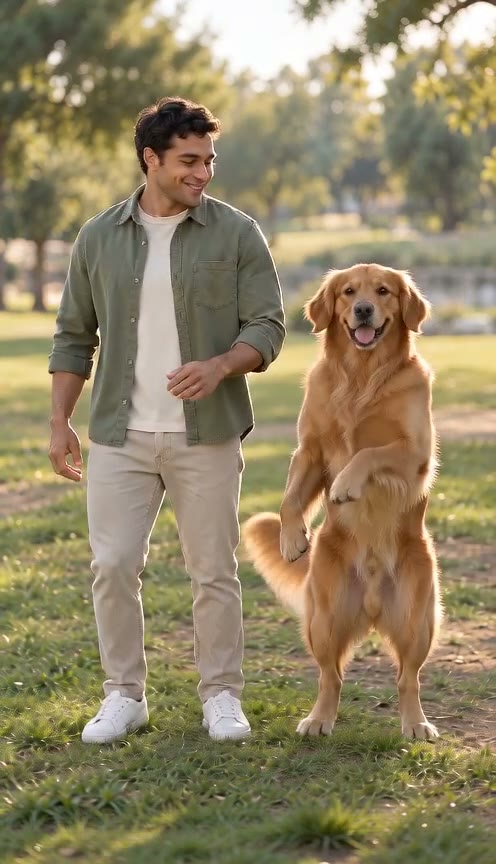
AI Pet Dance
Dance with your pet, pair two pets or let one pet take the stage. Choose clear character photos and keep each dancer distinct.
Pet Dance example · Fictional adults
The short answer
AI pet dance turns pet photos into a playful dance scene. You can plan a person and pet dancing together, two pets dancing together or a solo pet dance. The default input has two character positions, keeping the left and right dancers separate. Ordinary animals may be prepared as upright, human-like characters before the dance video is generated. Existing human-like characters and people use their original photos. Choose your character photos, review the pet dance video example and select a model before creating your own scene.
Choose a person and pet for AI pet dance
A person and pet can share one AI pet dance video using two separate photos. Upload the person or pet you want on the left in the first position, and the right character in the second position. The order is preserved during preparation and generation. Use a clear portrait of the person and a recognizable pet photo, preferably with visible limbs and space around the body. The pet dance video asks both characters to remain independent, rather than transfer a pet’s features onto the person or swap their positions.
You do not need to dress your pet or make it stand for the source photo. AI pet dance may prepare an ordinary animal as an upright character, while leaving the person’s photo unchanged. Choose a pet photo with visible ears, face and characteristic markings so those details can guide the prepared image. Avoid a person photo with several similar foreground faces. A person and pet scene should remain a creative animation, not proof that your pet performed the movement. Use photos you have permission to upload and animate.
Plan two pets dancing together or a solo pet dance
Two pets dancing together use one photo per pet. Different coat colors, facial features or clothing can help you inspect whether the AI pet dance video keeps each pet distinct. Put the left pet photo first and the right pet photo second, even when both photos have different backgrounds. The dance scene is generated as one shared setting; it is not expected to retain two separate locations. Your pet photo should contain one clearly dominant animal rather than a collage that leaves the intended dancer unclear.
For a solo pet dance, switch to Single Photo and upload one pet photo. AI pet dance then asks for one dancer and does not request a second pet or person. Switching between solo and two-character input keeps the uploaded photos available, while the selected mode determines how many are submitted. The default presentation stays focused on two characters, with a person and pet shown in the sample. A solo pet dance remains useful when you only have one suitable pet photo or want a simple character-focused clip.
How AI pet dance prepares an ordinary animal
AI pet dance observes the visible body structure in each character photo. A clear person or an already human-like pet character keeps its original image. A clearly ordinary animal may be prepared as an upright full-body pet character, with separated arms, complete legs and feet, and a simple neutral gray background. The preparation asks to preserve species, face, coat colors, markings, ears, tail and existing clothing. It does not ask for a human face or extra accessories. This changes the body presentation to make the planned dance easier to express.
Your pet photo may be a close-up that shows a recognizable face without the full body. In that case, the prepared pet character necessarily includes invented body details. AI pet dance cannot promise accurate hidden anatomy or a perfect likeness. If observation fails, times out or is uncertain, the original photo continues to generation under the existing permissive policy. That means an ordinary pet may sometimes reach the video model without preparation. Review the finished pet dance video rather than assuming every input took the same preparation route.
Choose simple movement for a pet dance video
The AI pet dance video uses modest side steps, slight knee bends and natural arm movement. Two characters are asked to move in a simple shared rhythm, retaining their separate identities and left-right positions. The scene does not require acrobatics, a copied music-video routine or a particular song. A steady shot keeps the pet character and any human partner easy to inspect. The planned movement is intentionally simple, but the model can still miss a step, alter a body detail or make one dancer less active than the other.
Choose five seconds for a short pet dance video or ten seconds for more time to show the movement. Portrait framing favors upright characters, while landscape framing can give two dancers more horizontal space. AI pet dance offers four Seedance models with their supported resolutions. Audio starts enabled for light ambient sound and natural footsteps, without requested dialogue or background music; switch it off for a silent pet dance video. Changing a model keeps your pet photo and other character photo. A setting change does not guarantee better pet identity or synchronized movement.
Check your AI pet dance video before sharing
Watch the AI pet dance video from beginning to end. Compare each pet’s face, ears and coat markings with the original pet photo. For a person and pet, also check that the human face stays human and that features do not move between characters. With two pets dancing together, inspect the left-right order and whether one pet disappears or merges into the other. Look at paws or hands, feet, tail movement and contact with the ground. An upright pet character is an adaptation, so separate that intended change from unexpected identity drift.
A completed task means the service delivered a technically valid video, not that the AI pet dance effect is necessarily convincing. Preparation can improve the input structure, but it does not guarantee successful replacement, anatomy or a natural dance. Site-funded observation and preparation do not add to the selected user video quote. If preparation clearly fails, the task stops and frozen video credits are released rather than submitting a paid video anyway. An unwanted visual result does not add an automatic refund or paid retry. The AI pet dance sample illustrates one fictional person and pet; it does not establish reliability across all animals and input photos.
How to plan your video
- Choose two character photos for a person and pet or two pets dancing together. Use Single Photo for a solo pet dance.
- Upload the left character first and the right character second. Check each pet photo for a clear face and recognizable markings.
- Select Pet Dance, choose duration and framing, then review Audio before creating your video. Inspect identity and movement in the delivered pet dance video.
Use photos and music you have permission to use. Provider input requirements and output quality vary.
Frequently asked questions
Can AI pet dance show a person and pet together?
Yes. Use two character photos for a person and pet, in your intended left-right order. The person keeps the original photo, while a clearly ordinary animal may be prepared as an upright pet character. Identity and dance quality still need review in the final video.
Does AI pet dance support one pet and two pets?
Yes. Single Photo requests a solo pet dance; Two Photos supports two pets dancing together or a person and pet. The mode controls the submitted photo count. One combined group photo is not supported in this version, because separate photos make the character roles clearer.
Will AI pet dance always humanize my pet photo?
No. Clear human-like characters keep their original photo, and uncertain or failed observation also continues with the original. Only a clearly ordinary animal is sent for preparation. AI pet dance may invent unseen body details, while asking to retain the pet’s face and markings.
Can I create an AI pet dance video here?
Yes. Choose two character photos for a person and pet or two pets, or Single Photo for one pet. The AI pet dance sample shows a fictional person and pet. Ordinary animals may be prepared before video generation; uncertain observations use the original image. Review the finished identities, limbs and movement before sharing.
Related scenes
Plan your next AI pet dance
Bring a person and pet or two pets into the same dance scene, or start with a solo pet dance.