
Bulin 47 AI Video Generator
Turn one photo into your own Bulin 47 AI freestyle video. Choose a short clip, generate and download.
The short answer
Make a Bulin 47 AI video from one clear photo. Choose a 5, 10 or 15-second freestyle, review the resolution and credit quote, then select Create video. Duet Booth uses a prepared performance and its audio to generate your version of the trend, with expressive movements and a lively street scene. You do not need to film yourself or write a prompt. Preview and download your finished video in History; appearance and movement can vary.
What is the Bulin 47 AI trend?
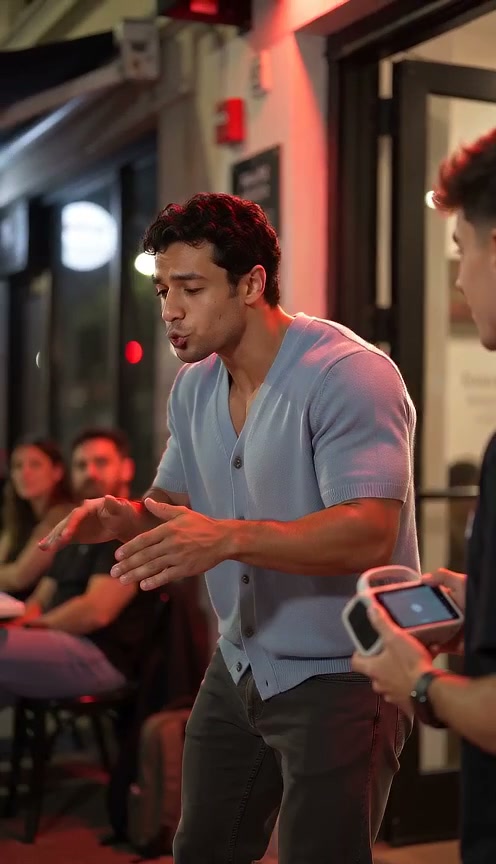
The Bulin 47 AI trend brings your own photo into a recognizable freestyle-style video. Its appeal is the upbeat street setting, shoulder movement, lively gestures and spontaneous feel of a handheld camera. A Bulin 47 freestyle video captures the energy of a short performance rather than telling a long story. Create a version featuring yourself or someone who has given you permission to use their photo.
The source clip and the AI example serve different purposes. The linked YouTube Short provides context for the Bulin 47 freestyle trend. It shows why the handheld framing, rhythmic shoulder movement and reactions from the people nearby stand out. The Duet Booth AI scene example features fictional adults and illustrates the kind of video you can create; it is not a promise of an identical result for every photo.
How does the Bulin 47 AI video generator work?
The Bulin 47 AI video generator uses one photo to guide how your chosen character appears in the generated freestyle. The preset provides the performance, movements, camera framing and street setting. You only need to upload the person you want to feature. People visible in the surrounding scene are part of the preset, so you do not need additional photos to create the Bulin 47 AI video.
Each Bulin 47 AI video is an AI-generated interpretation, so details in the character, clothes, gestures and background may change. A clear photo helps the model understand your intended appearance, but it does not guarantee an exact likeness in every frame. If you want to create a video with two new people instead of one main character, explore a Dance or Hug scene suited to that input.
Which photo works best for a Bulin 47 AI video?
Choose a sharp portrait with one main subject, a visible face and enough space around the head. A front-facing or slightly turned photo usually gives the Bulin 47 AI video generator more useful detail than a distant group photo. Natural light makes facial features easier to read. Avoid a tiny face, heavy filters, hands covering the eyes or a screenshot with interface elements over the subject.
Use a photo that reflects the character and outfit you want to see in your Bulin 47 AI video. Showing the hairstyle and upper clothing can help the AI create a more recognizable result. You do not need to copy any special pose because the freestyle preset guides the movement. Only upload photos you own or have permission to use, and get consent from any real person shown.
Should you choose a 5, 10 or 15-second freestyle video?
The three Bulin 47 freestyle video lengths follow corresponding parts of the prepared performance. The 5-second option gives you a quick moment for a short post, while 10 seconds shows more movement and 15 seconds offers a longer section. Choosing a longer clip changes how much of the performance appears in your generated video; it is not just a repeated loop of the shortest version.
Start with a duration that suits the video you plan to share. A shorter Bulin 47 AI video is quick to review, while longer versions give the gestures and camera movement more room. Review the available resolution and displayed credit cost whenever you change a setting. The Bulin 47 freestyle video uses a fixed vertical 9:16 format designed for mobile viewing, with no separate landscape setting in this workspace.
What does the generated Bulin 47 freestyle video include?
The generated Bulin 47 freestyle video features the character from your photo in the main performance role. It follows a prepared scene with rhythmic gestures, an energetic interaction, surrounding people and a handheld-camera feel. The rest of the scene provides context for the freestyle rather than requiring you to upload photos of everyone visible. As with other AI-generated videos, details can vary from one result to another.
The preset includes audio that follows the selected freestyle performance. Uploading a photo does not generate speech in your own voice, translate the words or let you choose custom lyrics. If you want an original performance with different vocals and a new theme, try Rap Video instead. Listen to the finished Bulin 47 AI video before sharing it, and check that your intended use of the audio is permitted.
How can you check a finished Bulin 47 AI video?
Watch your Bulin 47 AI video once at normal speed to judge the overall performance. Then look closely at the face during turns, the transition between visible and partially covered poses, and the interaction with the foreground person. These moments can reveal identity drift that is less obvious in a still image. Check the shoulders and hands too, since a Bulin 47 freestyle video depends on rhythmic gestures.
Listen to the finished Bulin 47 AI video before posting it. Check that the audio and visible performance feel consistent, without expecting frame-perfect lip synchronization. Confirm that your clip matches the selected duration and vertical format. A successful download means the file was delivered, not that every creative detail is flawless. The AI scene example is illustrative; review your own finished video rather than assuming it will match the example exactly.
Where can you find your Bulin 47 AI video?
After submitting your Bulin 47 AI video, use History to follow progress and open the result. You can leave the page while the task continues. Return using the same account to find the video and download it when it is ready. Keep your original photo until you have reviewed the output, so you can compare the intended appearance with the generated performer.
The Bulin 47 AI video generator shows the current credit quote before submission. Signing in or returning from payment does not automatically create a video: check the photo and settings, then choose Create video. If a technical failure occurs, the task follows the existing credit-return process. Creative differences such as facial drift or imperfect gestures are reasons to inspect a Bulin 47 freestyle video carefully, rather than assuming another paid attempt will necessarily fix them.
How to plan your video
- Upload one clear performer photo. Choose a recent portrait with a visible face and natural lighting for your Bulin 47 AI video.
- Select a 5, 10 or 15-second Bulin 47 freestyle video. Review the resolution and credit quote before creating your clip.
- Check your Bulin 47 AI video in History. Preview the character, movement and included audio, then download the finished video.
Use photos and music you have permission to use. Provider input requirements and output quality vary.
Frequently asked questions
Can I make a Bulin 47 AI video with one photo?
Yes. Upload one clear photo of the character you want in your freestyle. Duet Booth's Bulin 47 AI video generator includes the surrounding scene, so you do not need a second photo to create the video.
Will my Bulin 47 freestyle video show other people?
Yes. The generated Bulin 47 freestyle video can include other people as part of the prepared street setting. Your uploaded photo defines the main character; you do not need to provide images of the background participants. The details of the scene may vary.
Can I choose different lyrics for my Bulin 47 AI video?
No. The Bulin 47 AI video includes the audio associated with its selected performance preset. This tool does not offer custom lyrics, voice generation from your photo or translated speech. Review the audio before publishing.
Is the AI example the exact result I will receive?
No. The AI scene example uses fictional adults to illustrate the freestyle atmosphere. Your Bulin 47 AI video is generated using your photo and the selected preset, so its appearance, gestures and other visual details may differ.
Can I download the Bulin 47 freestyle video after leaving the page?
Yes. Return to History with the same account once the task is complete. Preview your Bulin 47 freestyle video, check its face and audio, then download the file for your chosen use.
Related scenes
Create your own freestyle video
Upload one clear photo, choose your video length and create a Bulin 47 AI freestyle.