
AI Hug Younger Self
Bring your current and younger self into one gentle embrace. Start with two photos from different ages.
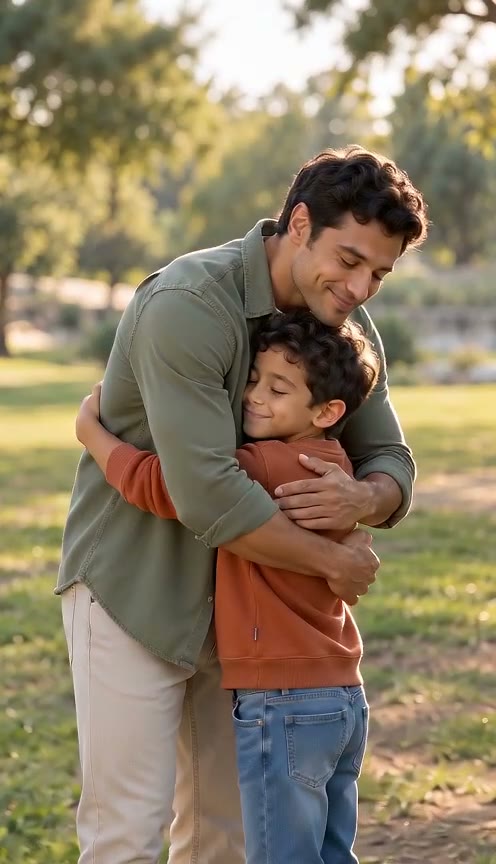
Younger Self Hug example · Fictional adults
The short answer
AI hug younger self creates an imagined meeting between two versions of you: the person in your current photo and the person in your childhood photo. The younger self hug follows a gentle approach and embrace, while asking the model to keep each age and appearance distinct. It is a creative scene rather than a record of an event. Use two separate photos, with your current photo first and your childhood photo second. Choose a model and review the example before creating your own younger self hug video.
Choose your current photo for AI hug younger self
Choose a current photo with a clear face, visible shoulders and a relaxed posture. The current photo provides the older version of you, so avoid an image where a hand, sunglasses or heavy blur hides the main facial features. For AI hug younger self, a waist-up or wider current photo gives the embrace room to develop. A tightly cropped selfie can still show identity, but it leaves less information about the arms and clothing. Your current photo does not need to match the childhood setting exactly; both versions will be brought into one imagined scene.
Use a current photo you have permission to animate. Prefer even lighting and one clearly dominant person. A busy current photo with several similar faces may make the intended subject ambiguous. If your current photo is taken from an extreme angle, consider another image that makes the face easier to read. AI hug younger self should preserve the older person’s hairstyle, clothing and visible age, rather than copying those features onto the childhood version. Check the current photo before selecting a model: higher resolution cannot restore identity information missing from the input.
Choose a childhood photo with a recognizable younger self
Your childhood photo supplies the younger version’s face, age, hairstyle and clothing. A childhood photo with one visible person is preferable to a crowded school group or a tiny figure at the edge of a family portrait. For AI hug younger self, use a photo where the child’s face is recognizable and the body outline is reasonably clear. If you scan a printed childhood photo, keep the print flat and avoid reflections. Do not expect a younger self hug to reveal details that were never visible in the source image.
The childhood photo can have a different background or lighting from your current photo. The model is asked to create a shared natural setting, so the result will involve interpretation. Avoid treating invented background details as historical facts. A childhood photo with severe damage or very low contrast may also make identity less consistent. Choose the clearest version already available before trying to animate it. AI hug younger self is designed around two ages of the same person, but this page does not verify identity or determine whether two photos actually show the same individual.
How AI hug younger self handles two ages
Your current photo is assigned to the left subject and your childhood photo to the right subject. The younger self hug asks both subjects to turn toward each other, approach gently and hold the embrace for a moment. The prompt keeps the two versions distinct and allows their posture to adapt to different heights. AI hug younger self should not turn the child into an adult or merge both faces into one. These are generation instructions rather than a promise that every frame will preserve age and identity perfectly.
An adult and a child may need different arm positions for a believable hug. The current version might bend slightly, while the younger version reaches upward. The younger self hug uses a steady shot so both faces and the movement remain easy to follow. Choose five seconds for a brief approach and embrace, or ten seconds for more time around the movement. Your current photo and childhood photo remain available when changing a supported model or setting. Keep both subjects visible in the planned framing rather than choosing a crop that leaves only one face.
Use a younger self hug as a personal imagined scene
AI hug younger self can illustrate a reflective birthday post, a personal timeline or a message to your past self. A younger self hug works best when its context is clear: the video is an imagined interaction created from two photos. You can add your own explanation when sharing it, rather than implying that the meeting happened. Your childhood photo may carry a strong emotional meaning, but the animation does not establish what either version of you felt. Choose a simple purpose for the scene and keep the visual interpretation in proportion.
For a private keepsake, decide where a younger self hug will be viewed before choosing portrait, landscape or square framing. A portrait hug video can emphasize the two figures; wider framing leaves space for a height difference and the surrounding setting. Audio is enabled by default for gentle natural ambience, with no requested dialogue or background music. You can turn Audio off for a silent hug video. AI hug younger self does not generate a spoken message from your childhood version, reproduce a particular memory or select a song on your behalf.
Check the younger self hug before you share it
Review a younger self hug from the first frame through the final embrace. Compare the adult face with your current photo and the child’s face with your childhood photo. Look for age drift, blended facial features, sudden clothing changes and unnatural arm contact. The hands and height difference deserve attention during the approach. A technically completed AI hug younger self video may still contain an unwanted interpretation. Judge the actual frames against your purpose instead of assuming that a successful task means a convincing hug.
If the result changes an important feature, keep it private or select a clearer input for a future attempt. Changing the current photo or childhood photo can change the outcome, but no setting guarantees a perfect recreation. Existing technical-failure handling applies when a video cannot be delivered; aesthetic dissatisfaction does not add an automatic refund or paid retry. The younger self hug sample uses fictional characters. Compare your two source portraits with the final hug video for identity, age, movement and audio; do not assume that an example predicts your own result.
How to plan your video
- Upload your current photo first. Check that the older subject is clear and has room for the embrace.
- Upload your childhood photo second. Prefer one recognizable younger self with visible shoulders and arms.
- Select Younger Self Hug, review duration, framing and Audio, then create your imagined hug video.
Use photos and music you have permission to use. Provider input requirements and output quality vary.
Frequently asked questions
Does AI hug younger self need two separate photos?
Yes. This version uses your current photo and your childhood photo in separate positions. One combined collage is not supported as the default input. The distinct positions tell the younger self hug which appearance belongs to each age, without asking the model to separate a collage.
Can AI hug younger self restore a damaged childhood photo?
No dedicated restoration step is included. Your childhood photo is used as a visual reference for the younger self hug. Choose a clearer scan if one exists; the animation may invent unclear details and should not be treated as an accurate restoration.
Will the younger self hug keep the child’s age?
The prompt asks AI hug younger self to retain the childhood age and keep both subjects distinct. This cannot guarantee an exact age or perfect identity preservation. Compare the child’s appearance with your childhood photo and inspect the embrace for merging or age drift.
Can I create an AI hug younger self video here?
Yes. Upload your current photo and childhood photo in their labeled positions, then choose a model, duration, framing and Audio. The younger self hug sample uses fictional characters and shows an imagined interaction. Your own result can differ, so check both faces, ages and hand movement before sharing.
Related scenes
Plan your AI hug younger self moment
Choose your current photo and a childhood photo for a gentle, imagined meeting between two ages.