
58th Floor AI Video Generator
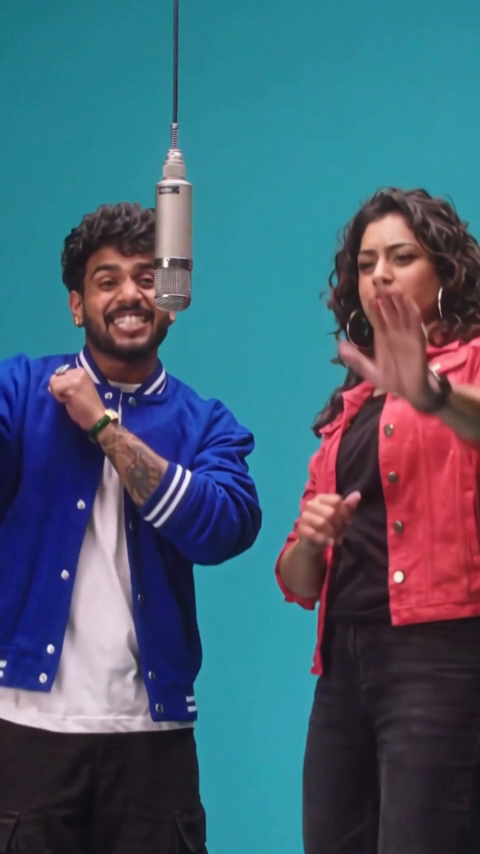
Two photos. One hanging mic. Create your 58th Floor AI video in a teal studio with a friend, partner or pet.
The short answer
58th Floor AI is a photo-to-video trend that recreates the shared-mic studio performance of Anderson .Paak and Cordae. Two characters stand in a teal room and trade the spotlight at one hanging microphone. To make your duo in Duet Booth, upload two photos, choose Original moves, select 5, 10 or 15 seconds, and create your vertical video. Find the completed clip in History.
What is the 58th Floor AI trend?
The 58th Floor AI trend recreates the recognizable duo setup from Anderson .Paak and Cordae’s A COLORS SHOW performance: a teal studio, one hanging mic and two performers reacting to each other. The appeal is the back-and-forth between the pair. One takes the spotlight while the other responds, making the interaction as memorable as the individual performance.
In your 58th Floor AI video, two photos supply the characters for that shared moment. Friends, partners or pets can take the stage together. Choose Original moves in Duet Booth for the recognizable studio performance. The name refers to the song, so the scene to look for is the teal music studio, rather than a rooftop or a high-rise apartment.
How to make a 58th Floor AI video
- Upload your First photo and Second photo. Choose one clearly visible person or pet in each image. The First photo supplies the left performer, while the Second photo supplies the right performer. Check both previews before you create your 58th Floor AI video.
- Keep Original moves selected for the recognizable 58th Floor AI studio performance. Choose 5, 10 or 15 seconds and an available resolution. The credit estimate updates with your settings, so select the clip that suits your plans before generating.
- Click Create video after checking your photos and credits. Return to History to follow progress, preview the finished performance and download your clip. Watch your duo together before choosing the moment you want to share with friends.
Use photos and music you have permission to use. Photo clarity and output quality vary.
Who are the performers, and is 58th Floor a song or a freestyle?
The original performers are Anderson .Paak and Cordae, and the song is “58th Floor.” Apple Music lists it on their joint album Heavy Is The Crown, dated October 23, 2026. A separate “58th Floor - A COLORS SHOW” release is dated October 30, 2026. The COLORS performance is therefore a performance of a released song, rather than an unnamed freestyle.
The original COLORS video is titled “Anderson .Paak & Cordae - 58th Floor | A COLORS SHOW.” That title is useful when you want to find the original performance after seeing an AI duo on your feed. The real artist performance and a 58th Floor AI video made with your photos are different kinds of video: the latter puts your selected characters in the studio performance.
If you know the Hotel Lobby AI trend, the shared microphone may look familiar. The scenes are different: 58th Floor uses the teal studio and the Anderson .Paak–Cordae pairing; Hotel Lobby is associated with Quavo and Takeoff. Choose the scene whose setting and performance match the clip you want to make.
How many photos do I need, and which character goes on each side?
Duet Booth needs two photos for a 58th Floor AI video, with one subject in each photo. The First photo supplies the left performer and the Second photo supplies the right performer. A single group selfie is not the input for this workspace. Choose each subject’s photo individually so the intended pair is clear before generating.
Choose a clear photo with one subject, even lighting and an unobstructed face. A front-facing or gently angled view makes the character easy to recognize. Leave room around the head and shoulders, and use a standing or wider portrait when you want the clothing to be clearly visible. Upload the original photo file instead of a small screenshot whenever possible.
Treat the First photo and Second photo as a pair. Photos with similarly clear detail help both performers feel equally intentional in your 58th Floor AI video. Different outfits, hair or animal markings make each character easy to follow at the shared mic. Choose images taken in different places; the photos do not need to show the two subjects standing together.
Use a photo you have permission to use for each character. Before creating, look at the upload previews: check that you selected the intended person or pet and that the subject fills a useful part of the image. This quick check is especially helpful when your camera roll contains several similar photos.
Can I make a 58th Floor AI video with my dog or cat?
Two friends make a natural 58th Floor AI video, but the format also works for partners, siblings and creative character pairings. Choose a pair with a familiar connection and let the studio performance provide the setting. A birthday message, a playful group-chat surprise or a shared memory can all begin with the same simple two-photo setup.
Pets can join the performance too. Try two pets or put yourself next to your dog or cat. Use a separate photo for each animal with visible eyes, ears and distinctive markings. The pet examples show the performance style you can explore. Keep the photo choices simple so the visual focus stays on your duo and their interaction at the hanging mic.
Which mode, duration and resolution should I choose?
Choose Original moves for the teal-studio 58th Floor AI look. New performance is useful when you want another interpretation of a duo performance using the available model settings. Each mode displays its supported options. Check the selected mode before creating, especially when returning to a saved draft after trying different settings.
A five-second 58th Floor AI video is a compact introduction to your duo and a useful first choice for a quick draft. Ten seconds gives the performers more time together. Fifteen seconds provides the longest available clip for a fuller moment at the mic. Choose the length based on what you want to show, rather than selecting the longest option automatically.
The workspace uses vertical 9:16 framing for this scene. Start at 480p for a quick draft, or choose a higher supported resolution for a more detailed download. Available resolutions depend on the selected model. Your credit estimate reflects the chosen settings; changing the length or quality updates that estimate before you submit.
Is 58th Floor AI free, and where do I download my video?
Creating your 58th Floor AI video uses credits. Inspect the options and examples before deciding which clip to make. Review the displayed total with your selected duration and resolution, then create when the settings match your budget. If your balance is below the current quote, the credit card explains the difference and shows the available packages.
After submission, your task continues in the background. Open History to check its progress and find the completed video. Preview the full clip there, then download the result you want to keep. If you return on another visit, sign in with the same account so you can access your own creations and credit balance.
When reviewing your 58th Floor AI video, watch how both characters share the frame and choose the section that best shows their personalities. A short, recognizable opening helps viewers understand the duo immediately. Keep a downloaded copy of the finished clip for your own collection, and use the same two-photo workflow when you have another pairing in mind.
58th Floor AI video examples
Frequently asked questions
Can I make the 58th Floor AI trend without CapCut or a prompt?
Yes. Duet Booth creates the 58th Floor AI video from two photos in the browser. Select Original moves, choose the settings and create. You do not need to import a CapCut template, record a performance or write a prompt.
Is 58th Floor the same as the Hotel Lobby AI trend?
They are different studio performances. 58th Floor features Anderson .Paak and Cordae in a teal COLORS studio. Hotel Lobby is associated with Quavo and Takeoff. Choose the 58th Floor AI workspace for the teal-room duo.
Is a 58th Floor AI video generator free?
Video generation uses credits, with the total shown before you create. Duration, resolution and model affect the quote. Choose five seconds at 480p in Original moves for the lowest available specification in that mode.
Do I need a 58th Floor template or prompt?
You do not need to write a prompt or import a CapCut template. The 58th Floor AI workspace provides the scene and settings. Bring two photos, choose your options and create directly in Duet Booth.
Where can I find my completed 58th Floor AI video?
Open History in the workspace or My videos from the site footer. Sign in with the same account used to create the clip. Preview completed videos and download them from your account.
Related scenes
Share the mic in your 58th Floor AI video
Choose two photos and bring your duo into the teal studio. Start with a short clip, or choose a longer performance for more time together.